Sprint 3: Javascript & the DOM
The Difference between HTML, CSS, & JavaScript
An analogy to describe these web development languages is to think of a webpage as being a clothing store window.
The HTML, which is the content (or words and pictures) on the webpage, can be represented by bare mannequins. Just as you may find multiple mannequins in a window, you will also find multiple blocks of content on a page. The CSS, which styles the content, can be represented by the clothes that the mannequins wear. One mannequin is dressed as a Goth, another as a hippie. One is having an identity crisis and is wearing rave pants with a tennis polo... Lastly, the Javascript determines how a webpage behaves when interacted with, such as pop-ups appearing when the user scrolls down. Now imagine that our mannequins are robotic and can react to stimulus, for example, when they see a person pass by they may be programmed to react by waving. A webpage needs HTML, CSS, and Javascript to determine the content, styling, and behaviour in order to be appealing and interactive to the user.
Control Flow, Functions, & Loops
In Javascript, Control Flow refers to the order in which code is executed, which is from the top line to the bottom line unless something in the code states otherwise. For example, if I were to break down the steps of going to a desired webpage, this might involve turning my computer on, entering my password, opening my browser, then typing in the web address. I have to do things in this specific order or else I won't get the desired result (it would be pointless to type in the web adddress without turning my computer on first!). Javascript works in the same way, in that certain steps need to be performed in a certain order to work effectively.
Functions act as the building blocks in Javascript - they are literally blocks of code that perform particular tasks. Think of them like a procedure with multiple steps and variables. Rather than repeating the code every time we want to perform the same procedure, a function allows us to change the variables (called parameters) and execute the code without having to rewrite the code repeatedly. For example, if I was making a salad for myself, the steps might include: dicing the tomato, dicing the boiled egg, cutting some lettuce, then putting all the ingredients in the bowl. If I make a salad for a friend with an aversion to boiled egg, I might use chicken instead. Rather than writing all the steps again when I am only changing the protein component of the salad, I would use a function as I can input a parameter to be changed, such as the protein type. This would allow me to make the salad with different protein types without having to write out all the steps of the code again. Through using Functions, our code becomes more efficient.
Loops are a function in our Javascript code that can disrupt the Control Flow. Specifically, Loops are used when we want to run the same code for a certain amount of times. Rather than writing the same same code out repeatedly, we use a Loop instead. For example, if I had 10 tabs open in my browser and I wanted to close all of them but the first tab, rather than writing the same code 9 times to close the 9 tabs, I could use a Loop instead. In plainspeak, my Loop might say: starting from the second tab and continuing until the 10th tab, close the tab then move onto the next tab and do the same until you've closed the 10th tab.
The DOM 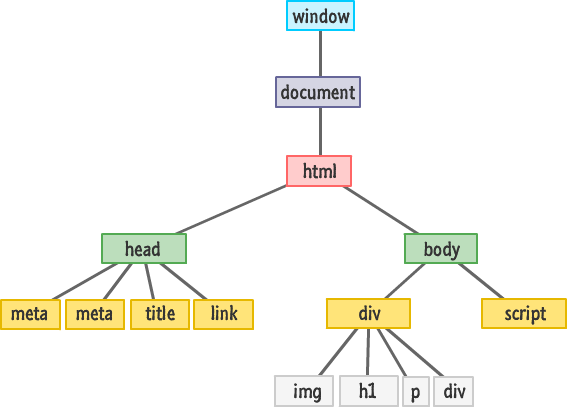
Previously, we discussed a web page as being composed of HTML (the content), CSS (the styling), and Javascript (the interactivity). However, by themselves these are just lines of garbled code. It is our browser (Chrome, Firefox, Internet Explorer etc.) that interprets and displays these languages as a web document, all working together to create what is seen before our eyes. More specifically, there is a hierarchical structure that is used by the browser to understand what the code is saying. This structure is the Document Object Modifier and represents and interprets the code as objects and nodes, allowing Javascript to make changes to all the HTML and CSS.
This hierarchical structure allows the elements and attributes of the code to be easily accessed for dynamic manipulation. If we wanted to change the heading of a webpage, we could do so by accessing the h1 element from our browser and type in a new heading, as the below example shows.


The Difference between Arrays and Objects 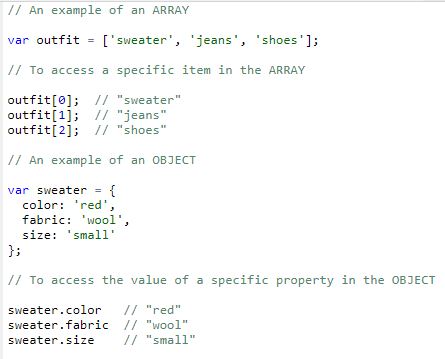
In Javascript, Objects and Arrays exist as ways to store data.
An Array is a variable that can hold multiple values; think of it as being similar to a list. The same way you would number the items in a list, you number the values in an Array, except that you start from zero rather than one. Each item in the Array can be accessed individually using the item's index in square brackets. For example, if we think of our store window mannequins, each will be wearing a different outfit. The example shows what such an array might look like and how an item in the Array can be accessed.
Objects are similar to Arrays, except they store properties. So, if we wanted to store the properties of our "sweater" item, we would list the property name, followed by a colon, then state the property value. Each property is separated by a comma and new line, and the entire object is surrounded by curly braces. To access the value of specific property, we use the object name followed by a fullstop, then the object property.